










Screen2ipcam for Windows
- Trial version
- 4.5
- 4
- V2.0.5
Download for Windows
View an ad to download for free

- MagicWeb
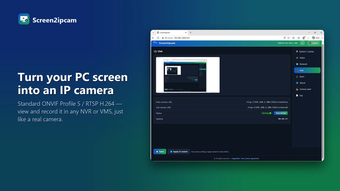
Turn any Windows screen into an ONVIF / RTSP IP camera
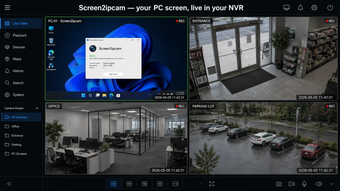
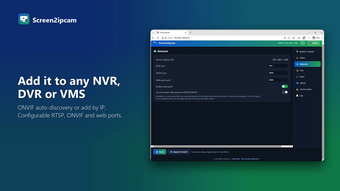
Screen2ipcam turns a Windows PC screen into a standard ONVIF Profile S / RTSP IP camera. Your NVR, DVR or VMS finds it on the network and records it like any other camera, with no capture card and no HDMI encoder.
It is used to record cashier and POS screens next to the shop cameras, factory SCADA and HMI screens, exam and classroom computers, and control-room dashboards. Install it on the PC, then on the recorder choose Add camera and ONVIF. The PC shows up by itself, or you add it by IP.
Main features:
- ONVIF Profile S auto-discovery, or add it by IP address
- H.264 RTSP main and sub streams, plus JPEG snapshot
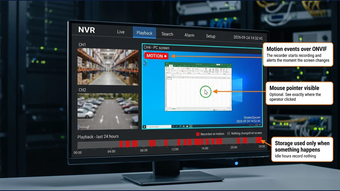
- Motion recording (new in 2.0.5): the recorder records only when the screen changes, which saves disk space
- Optional mouse pointer in the stream, to see where the operator clicked
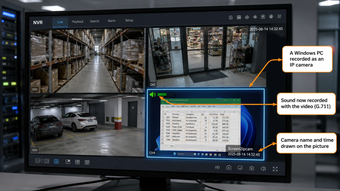
- The PC's own sound in the same stream (G.711)
- Camera name, date and time drawn on the picture, with corner and transparency settings
- Optional alert on the PC while someone is watching
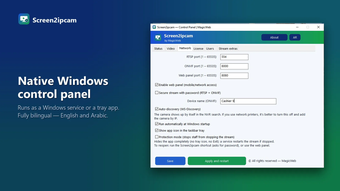
- Runs as a Windows service or a tray app, with a web and a native control panel in English and Arabic
- About 2% CPU while streaming, no .NET and no extra runtimes
- Windows 7 SP1 to Windows 11, 32 and 64-bit, Windows Server, IoT / Embedded / POSReady
Tested with Hikvision, Dahua, Intelbras, XMEye, Milestone, Genetec, Network Optix, Blue Iris, Agent DVR, Synology, QNAP and VLC.
The installer here is the official Microsoft Store installer, digitally signed by Microsoft Corporation. It installs the free Screen2ipcam edition from the Microsoft Store, which keeps itself up to date. The free edition has all the features above. After 14 days a small watermark shows on the stream, and a one-time lifetime license for one PC removes it, with no subscription.
Loading…
App specs
Developer
- MagicWeb
License
Trial version
Version
2.0.5
Latest update
Platform
Windows
OS
Windows Server
Language
English
Available languages
- English
- Arabic
Downloads
4
Last month's downloads
- 4
Size
813.09 KB
Screen2ipcam for PC
- Trial version
- 4.5
- 4
- V2.0.5
Download for PC
View an ad to download for free
User reviews about Screen2ipcam
Have you tried Screen2ipcam? Be the first to leave your opinion!
Add reviewTop downloads Streaming videos for Windows
Top downloads Streaming videos for Windows
Top downloads Streaming videos for Windows
Latest articles

Henry Cavill’s Mustache Protocol launches this month for men’s health

Nintendo doesn’t plan to raise the price of the Switch 2 despite the component shortage

Google Earth now has a new Play Store icon: subtler and more modern

BlueFlag Security’s 2026 report: 99% of repository tokens never expire

Unity is reportedly in early buyout talks: Saudi Arabia’s PIF and Silver Lake involved
Laws concerning the use of this software vary from country to country. We do not encourage or condone the use of this program if it is in violation of these laws. Softonic does not encourage or condone the illegal streaming, duplication or distribution of copyrighted content. You are solely responsible for any use of the service. Softonic may receive a referral fee if you click or buy any of the products featured here.